Next Century - Troubleshooting "Waiting for first Check-In"
Next Century
Troubleshooting: "Waiting for First Check-In" Alert
If your NextCentury Transceiver is displaying a "Waiting for First Check-In" alert, it means the device has not yet established its initial communication link with the Gateway. This is common during new installations or after a battery replacement.
Follow these steps to manually trigger a check-in and clear the alert.
Step 1: Open the Transceiver Enclosure
To access the internal components, you must first remove the outer plastic casing.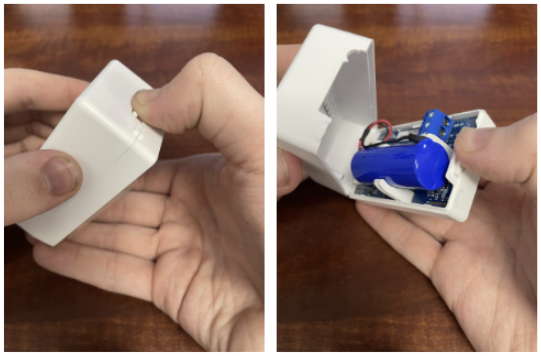
Locate the Transceiver mounted near the meter.
Gently apply pressure to the release tabs to remove the cover.
Set the cover aside to expose the internal circuit board.
Step 2: Locate and Press the Reset Button
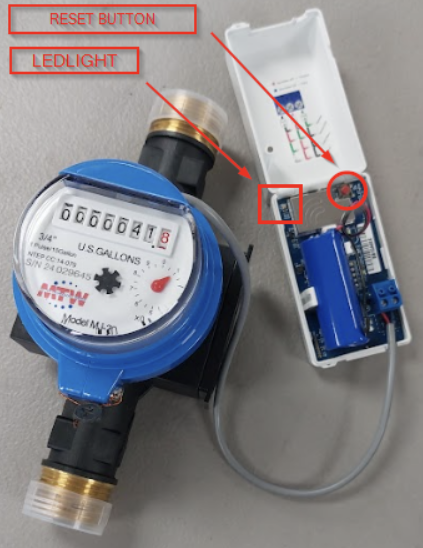
Once the board is exposed, you will need to initiate a manual sync.
Identify the small Reset Button (usually a small tactile button on the face of the board).
Press and release the button firmly once.
Step 3: Confirm Success (LED Indicators)
Watch the LED light on the board immediately after pressing the button to confirm the status:
| LED Sequence | Meaning |
| Red Flash → Green Flash | Success. The device has powered on and successfully communicated. |
| No Light | Battery Issue. Ensure the battery is seated correctly or replace it with a new one. |
| Solid Red | Sync Error. The device may be out of range of the Gateway or Repeater. |
Important Notes
Data Latency: After a successful reset, it may take up to 5–10 minutes for the "Waiting for First Check-In" alert to disappear from your web portal or mobile app.
Enclosure: Ensure the cover is snapped back on securely to protect the electronics from dust or moisture.
Related Articles
Next Century - Transceiver(s) Offline
Next Century Troubleshooting Offline Transmitter(s) OVERVIEW: The Next Century transceivers have 2-way communication in the form of an LED status light on the inside of the device. This will change color based on if the transceiver can talk with the ...Overview & Installation Steps - Next Century Submetering System
Overview & Installation Steps Next Century Submetering System Congratulations on your new Submetering System! Your new Next Century System is a top-tier product that will provide you with cloud-based access to your metering data via the Next Century ...Next Century System - Gateway Offline
Next Century Troubleshooting System Offline OVERVIEW: The Next Century Gateway has integrated Ethernet, Wifi, and Cellular capabilities. I have broken down each connection with its own troubleshooting guide. Before that however, there is a basic ...Connecting the Next Century Gateway to the Internet (Wi-Fi)
Connecting Your Next Century Gateway to the Internet This guide provides instructions for connecting your Next Century Gateway to the internet using the mobile application. Section 1: Connecting the Next Century Gateway to the Internet The Next ...Next Century - Non-Advancing Meter (No Consumption)
Next Century Troubleshooting No Consumption/Non-Advancing Meter 1. Non-Advancing Meter We would like you to turn on water within the following unit and look directly at the center dial on the meter and determine if its spinning. If the center dial of ...